> ## Documentation Index
> Fetch the complete documentation index at: https://docs.dataerai.com/llms.txt
> Use this file to discover all available pages before exploring further.
# Attribution & the research record
> Dataerai connects your data to the research record — grants, funding agencies, publications, and researchers — for credit, reporting, and reproducibility.
Research data doesn't stand alone: it's funded by **grants**, produced by **people**, and cited in **publications**. Dataerai maintains a research-record graph that connects your data to this context, so credit, funding, and outputs travel with the data.
## What's in the research record
* **Grants** and **funding agencies** — the awards and funders behind the work.
* **Works** — scholarly publications, aligned with open scholarly metadata (OpenAlex), along with their authors, institutions, sources, and topics.
* **People** — canonical researcher identities, including identifiers like ORCID.
Together these let you answer questions like *which grant funded this data?* and *which publications came out of it?* — and they complement the [provenance](/organize/provenance) you capture between assets.
## Find grants
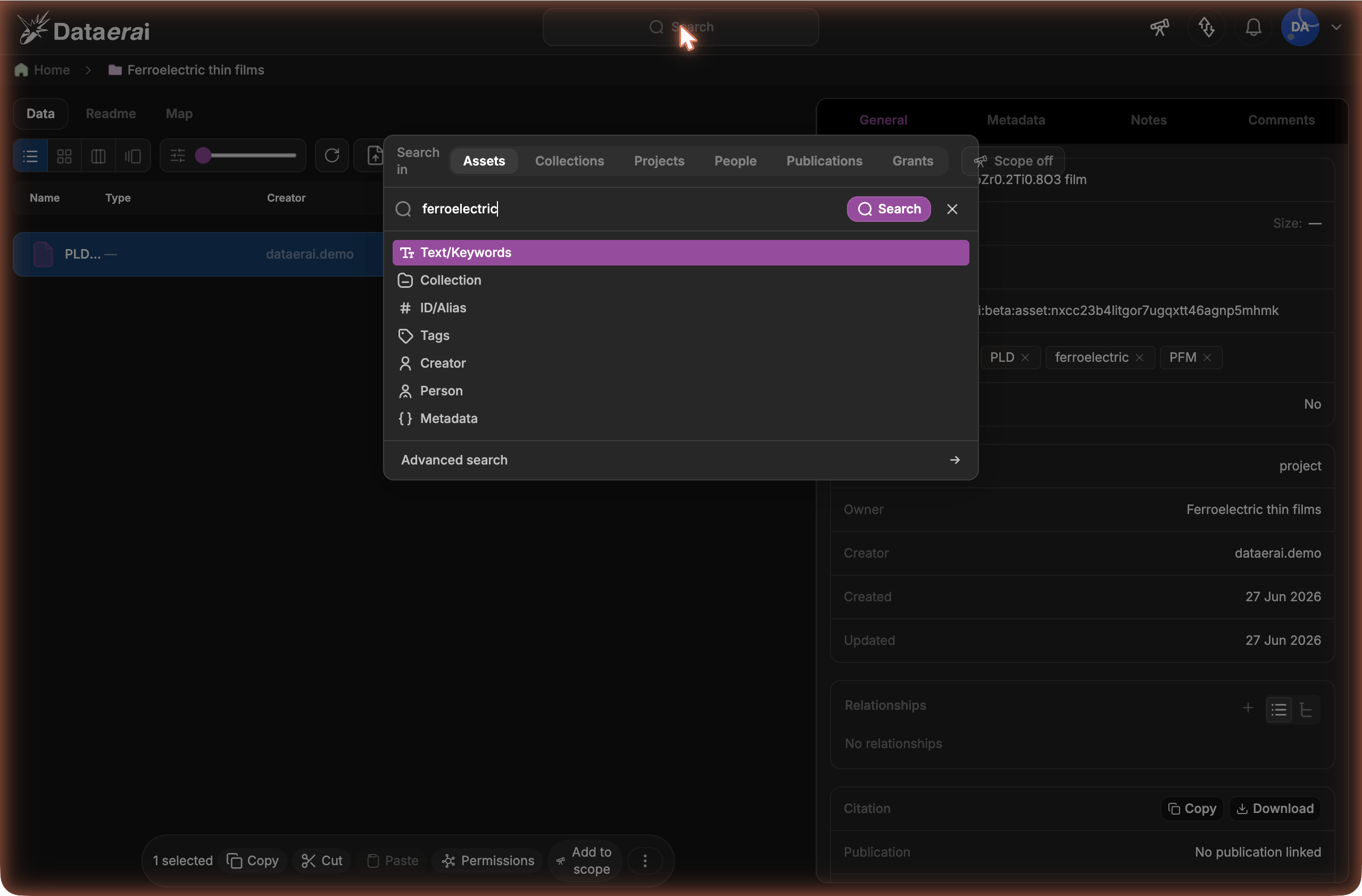
On the search page, open the **Search in** selector (alongside **Assets**, **Collections**, **Projects**, **People**, and **Publications**) and choose **Grants**, then enter your search term. Dataerai finds awards by title, funder, award number, keyword, or metadata term — searching both grants already in your organization and grant records discovered from OpenAlex.
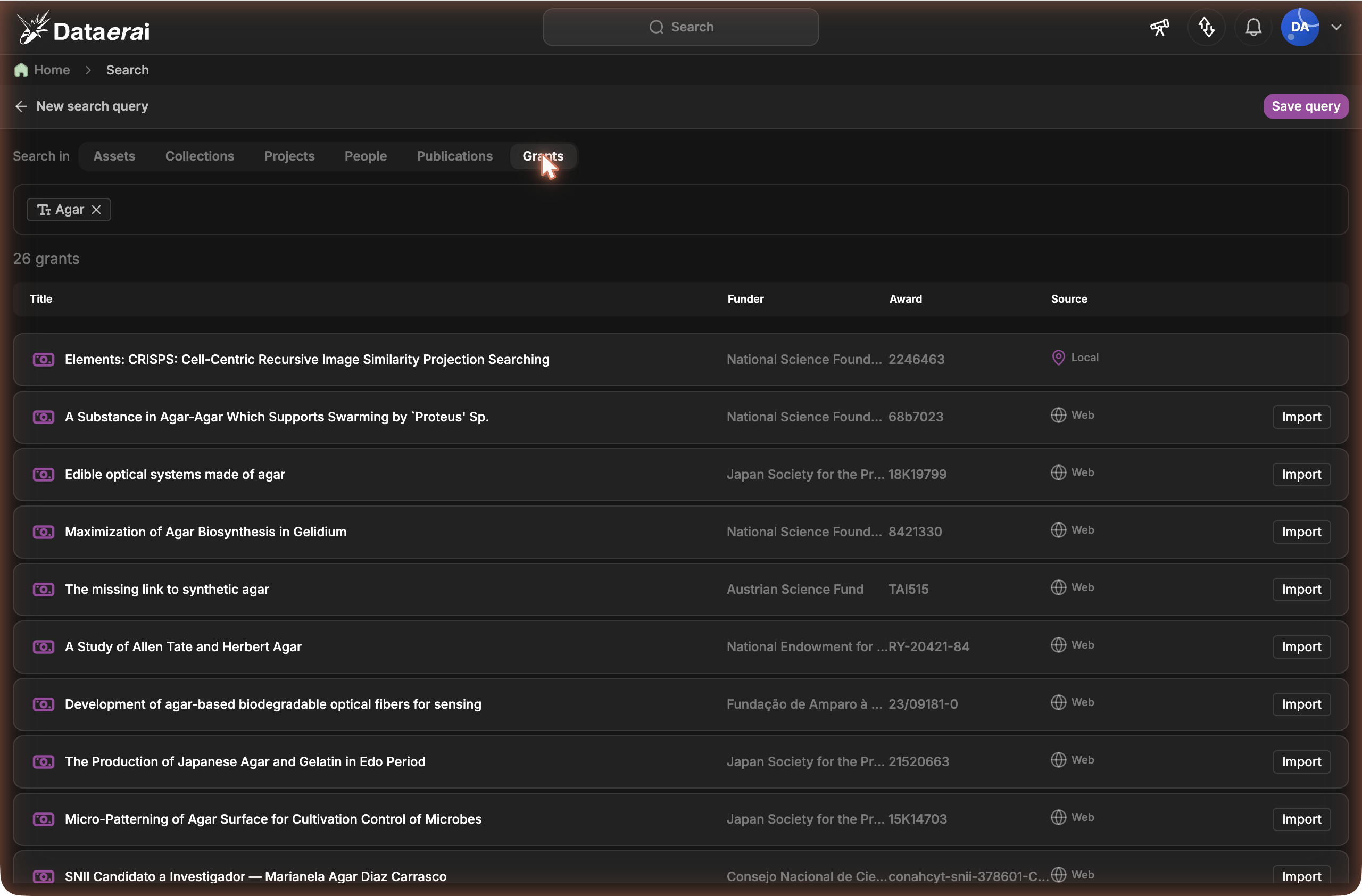
 The results table shows where each grant came from:
| Badge | Meaning |
| ----------------------- | ------------------------------------------------------------ |
| **Local** | The grant already exists in Dataerai. |
| **Web** | The grant was discovered from OpenAlex publication metadata. |
| **Local · also on web** | A Dataerai grant also matched an OpenAlex grant record. |
Click a result to open the grant sidebar. The sidebar shows the funder, award ID, grant key, funding details, fiscal year, description, tags, and metadata. Long grant details scroll inside the right pane, so the results table stays visible while you review the grant.
The results table shows where each grant came from:
| Badge | Meaning |
| ----------------------- | ------------------------------------------------------------ |
| **Local** | The grant already exists in Dataerai. |
| **Web** | The grant was discovered from OpenAlex publication metadata. |
| **Local · also on web** | A Dataerai grant also matched an OpenAlex grant record. |
Click a result to open the grant sidebar. The sidebar shows the funder, award ID, grant key, funding details, fiscal year, description, tags, and metadata. Long grant details scroll inside the right pane, so the results table stays visible while you review the grant.
 ## Open a grant information page
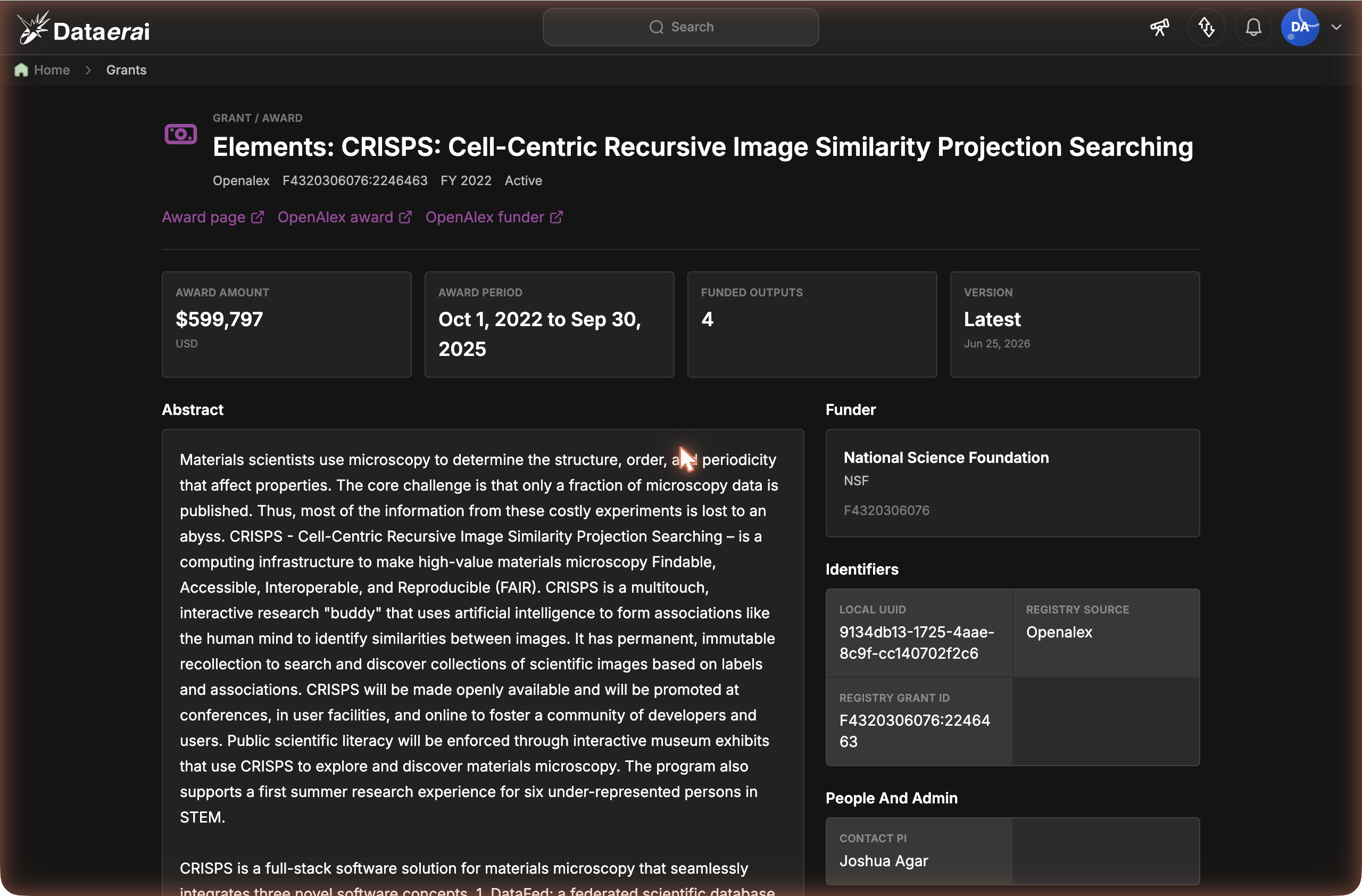
For a **Local** or **Local · also on web** result, click the grant title to open the full grant information page. The page gives the award a stable URL that you can share with collaborators who have access to the same Dataerai environment.
The information page shows the award amount, award period, funded-output count, funder, identifiers, contact PI, agency administration fields, classification, terms, and external award links. When the grant was imported from OpenAlex, the page also shows the OpenAlex award and funder links and lets you inspect the stored OpenAlex award payload.
## Open a grant information page
For a **Local** or **Local · also on web** result, click the grant title to open the full grant information page. The page gives the award a stable URL that you can share with collaborators who have access to the same Dataerai environment.
The information page shows the award amount, award period, funded-output count, funder, identifiers, contact PI, agency administration fields, classification, terms, and external award links. When the grant was imported from OpenAlex, the page also shows the OpenAlex award and funder links and lets you inspect the stored OpenAlex award payload.
 **Web** results need to be imported before they have a Dataerai grant information page. Use **Import** in the sidebar first, then open the local grant from the result title.
### Funded works, investigators, and related grants
Below the award details, the grant information page shows the grant's connections — the same way assets show their relationships — in three panels:
* **Investigators** — the grant's principal and co-investigators, each tagged with their role. A name links to that person's [detail page](/discover/person-detail) when they're in your workspace.
* **Funded works** — the publications the grant funded, most-cited first, with a total count. Each row opens the [work's detail page](/discover/works-search).
* **Related grants** — other grants that funded the **same** publications, ranked by how many outputs they share. Each row opens that grant's page.
Each panel shows a sample with the total count, and an empty state when the grant has no links yet — for example, a grant imported before its outputs were available; re-importing fills them in.
## Import a grant
For a **Web** result, click **Import** to add the grant to Dataerai. The **Import** button appears both inline on the result row and in the grant sidebar. Import creates or reuses the funding agency and grant record, and pulls in the award's full details from OpenAlex — the real title, award amount, award dates, abstract, and funder information — so the imported record is richer than the search row that produced it. After import, the same result appears as **Local · also on web** because the award is now in your organization and still linked to the OpenAlex record.
Import doesn't just store the award — it **connects** it. Alongside the funder and grant record, Dataerai brings in the grant's **funded publications** and, through them, the works' **authors** and **institutions**, plus the grant's **investigators** — so an imported grant arrives linked to the rest of the research graph rather than as a standalone record. Dataerai imports the grant's directly-funded works (one hop — it doesn't keep crawling each publication's own references); a grant with many outputs imports the first batch immediately and the rest in the background.
OpenAlex does not expose a grants search endpoint. Dataerai discovers OpenAlex grant records from matching publications, then imports the grant as a local record — enriched from OpenAlex's award entity — so you can search it directly later.
## Manage grants with the API
You can also manage grants and funding agencies through the Dataerai API. The relevant endpoints are:
| Endpoint | What it does |
| ---------------------------------------------- | -------------------------------------------------------------------------------------------- |
| `GET/POST /api/funding-agencies/` | List or create the funders behind awards. |
| `GET/PATCH/DELETE /api/funding-agencies/{id}/` | Read, update, or remove a funding agency. |
| `GET/POST /api/grants/` | List or create grants (award title, funder, dates, amount, awardee organizations, keywords). |
| `GET/PATCH/DELETE /api/grants/{id}/` | Read, update, or remove a grant. |
| `GET /api/grants/{id}/detail/` | The grant's relationship panels — funded works, investigators, and related grants. |
| `GET /api/grants/search/` | Search local grants and OpenAlex grant records together. |
| `GET /api/grants/preview/` | Preview the grant that would be imported from an OpenAlex result. |
| `POST /api/grants/imports/` | Import an OpenAlex grant into Dataerai. |
A typical flow is to create the funding agency, then the grant that references it:
```bash theme={null}
# Create a grant (authenticate as shown in the API reference)
curl -X POST "$DATAERAI_SERVER/api/grants/" \
-H "Authorization: Bearer $TOKEN" \
-H "Content-Type: application/json" \
-d '{
"title": "Coastal sediment dynamics",
"funding_agency": "",
"start_date": "2024-01-01",
"end_date": "2026-12-31"
}'
```
See [Authentication](/api-reference/authentication) for how to obtain a token, and the [API reference](/api-reference/introduction) for the full field list.
The broader scholarly graph — **works**, **people**, **institutions**, and **topics** — is maintained as connected reference data that links your research to its published context.
## Next steps
Capture how your data came to be.
Work with grants and funding agencies programmatically.
**Web** results need to be imported before they have a Dataerai grant information page. Use **Import** in the sidebar first, then open the local grant from the result title.
### Funded works, investigators, and related grants
Below the award details, the grant information page shows the grant's connections — the same way assets show their relationships — in three panels:
* **Investigators** — the grant's principal and co-investigators, each tagged with their role. A name links to that person's [detail page](/discover/person-detail) when they're in your workspace.
* **Funded works** — the publications the grant funded, most-cited first, with a total count. Each row opens the [work's detail page](/discover/works-search).
* **Related grants** — other grants that funded the **same** publications, ranked by how many outputs they share. Each row opens that grant's page.
Each panel shows a sample with the total count, and an empty state when the grant has no links yet — for example, a grant imported before its outputs were available; re-importing fills them in.
## Import a grant
For a **Web** result, click **Import** to add the grant to Dataerai. The **Import** button appears both inline on the result row and in the grant sidebar. Import creates or reuses the funding agency and grant record, and pulls in the award's full details from OpenAlex — the real title, award amount, award dates, abstract, and funder information — so the imported record is richer than the search row that produced it. After import, the same result appears as **Local · also on web** because the award is now in your organization and still linked to the OpenAlex record.
Import doesn't just store the award — it **connects** it. Alongside the funder and grant record, Dataerai brings in the grant's **funded publications** and, through them, the works' **authors** and **institutions**, plus the grant's **investigators** — so an imported grant arrives linked to the rest of the research graph rather than as a standalone record. Dataerai imports the grant's directly-funded works (one hop — it doesn't keep crawling each publication's own references); a grant with many outputs imports the first batch immediately and the rest in the background.
OpenAlex does not expose a grants search endpoint. Dataerai discovers OpenAlex grant records from matching publications, then imports the grant as a local record — enriched from OpenAlex's award entity — so you can search it directly later.
## Manage grants with the API
You can also manage grants and funding agencies through the Dataerai API. The relevant endpoints are:
| Endpoint | What it does |
| ---------------------------------------------- | -------------------------------------------------------------------------------------------- |
| `GET/POST /api/funding-agencies/` | List or create the funders behind awards. |
| `GET/PATCH/DELETE /api/funding-agencies/{id}/` | Read, update, or remove a funding agency. |
| `GET/POST /api/grants/` | List or create grants (award title, funder, dates, amount, awardee organizations, keywords). |
| `GET/PATCH/DELETE /api/grants/{id}/` | Read, update, or remove a grant. |
| `GET /api/grants/{id}/detail/` | The grant's relationship panels — funded works, investigators, and related grants. |
| `GET /api/grants/search/` | Search local grants and OpenAlex grant records together. |
| `GET /api/grants/preview/` | Preview the grant that would be imported from an OpenAlex result. |
| `POST /api/grants/imports/` | Import an OpenAlex grant into Dataerai. |
A typical flow is to create the funding agency, then the grant that references it:
```bash theme={null}
# Create a grant (authenticate as shown in the API reference)
curl -X POST "$DATAERAI_SERVER/api/grants/" \
-H "Authorization: Bearer $TOKEN" \
-H "Content-Type: application/json" \
-d '{
"title": "Coastal sediment dynamics",
"funding_agency": "",
"start_date": "2024-01-01",
"end_date": "2026-12-31"
}'
```
See [Authentication](/api-reference/authentication) for how to obtain a token, and the [API reference](/api-reference/introduction) for the full field list.
The broader scholarly graph — **works**, **people**, **institutions**, and **topics** — is maintained as connected reference data that links your research to its published context.
## Next steps
Capture how your data came to be.
Work with grants and funding agencies programmatically.