Understand where your data lives — repositories provide storage, and allocations are the space assigned to you or your projects. See how to check usage, pick where data goes, and set a default.
Use this page to understand where new data goes and how much space is available.Two terms matter:
Repositories are storage locations.
Allocations are the storage space assigned to you or a project.
Most storage setup is handled for you. You will mainly notice it when uploading
data, choosing a destination, or checking usage.
A repository is a storage location available to your organization. You don’t manage its internals — you just see which repositories your organization has and store data in them through allocations.
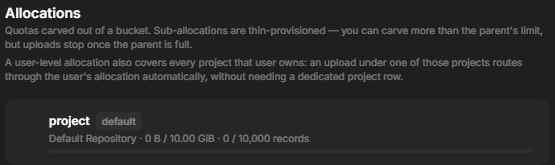
An allocation is storage space assigned to you or to a project.Each allocation shows:
How much space you can use.
How many records you can store.
Whether it is the default place for new data.
A friendly name, when one is set.
Allocations can also sit under a larger parent allocation, so project usage can
roll up into an organization-wide pool.Admins who manage storage also see owner tags in Allocations and
Repositories. These blue tags show which person, project, organization, or
unassigned pool owns the allocation, so admins can scan quota ownership without
opening each row.
When you create a collection, you can pick which allocation its data uses, or leave it on the owner’s default. Sub-collections and assets inherit that choice, so you usually set it once at the top.If someone has Write access to a project, they can use the allocations
assigned to that project when they add project data. They do not need separate
access to the organization-wide storage pool, and they cannot move or manage
allocations unless they also have the appropriate admin access.
Mark an allocation as the default for yourself or a project to make it the automatic destination for new data. You can change the default at any time; it only affects where new data is placed.
Running low on space? Remove data you no longer need, place new data in a different allocation, or ask an organization admin to raise your quota.