Control access to projects, collections, and assets with Read, Write, and Admin roles that cascade through the hierarchy.
Dataerai controls access per object. You can set permissions on a project, a collection, or an asset, using three roles.
1
Open permissions
For an asset, select it and click Permissions in the action bar that appears when something is selected. For a project or collection, open its Settings from the sidebar — the same access controls live there.
The action bar for a selected item — open Permissions.
2
Set access
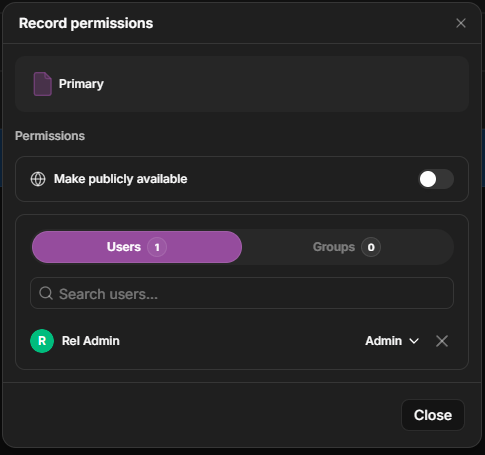
The dialog has a public-access toggle, Users and Groups tabs, and a role per grantee.
The permissions dialog — a public-access toggle, Users and Groups tabs, and a role (Read / Write / Admin) per grantee.
View the object — its metadata, content, and notes.
Write
Everything in Read, plus edit metadata, content, and notes (and add or manage items in a collection).
Admin
Everything in Write, plus share the object with others (and lock an asset).
Switch between the Users and Groups tabs, then set each grantee's role from the dropdown.
What each role grants is tailored to the object:
Project — Read sees and lists the project; Write can edit it and add data
using the project’s assigned allocations; Admin can share it.
Collection — Write can also add and organize the items inside; Admin can share.
Asset — Read includes the file content and notes; Admin can also lock the asset.
Project Write does not make someone a storage admin. They can use allocations
already assigned to the project, but they cannot move allocations between
projects or browse the organization’s storage pool unless they also have the
right admin access.
Access granted higher in the hierarchy flows down: someone with Read on a project can read the collections and assets inside it. You can grant access on a specific item to widen or narrow it for that item.A dataset is governed through this same hierarchy — through the project, collection, and assets it draws from — rather than through a separate sharing dialog of its own. Restricted fields within a dataset can be kept protected even on data you otherwise share.