

Search for a work
1
Choose the Publications scope
Use the Search in selector to choose Publications (alongside
Assets and People) — pick it from the search bar before you start, or
switch to it after a search. Type a title or keyword in the search bar.
2
Local + web, merged
Dataerai searches the works already in your workspace and the OpenAlex graph
at the same time, merges the two, and de-duplicates by OpenAlex id. An origin
icon shows where each row came from — a pin for your workspace, a globe for
the web. If the web search is slow or unavailable, Dataerai still returns your
workspace results and shows an OpenAlex results unavailable note, so a
lookup never fails outright or waits on an external service.
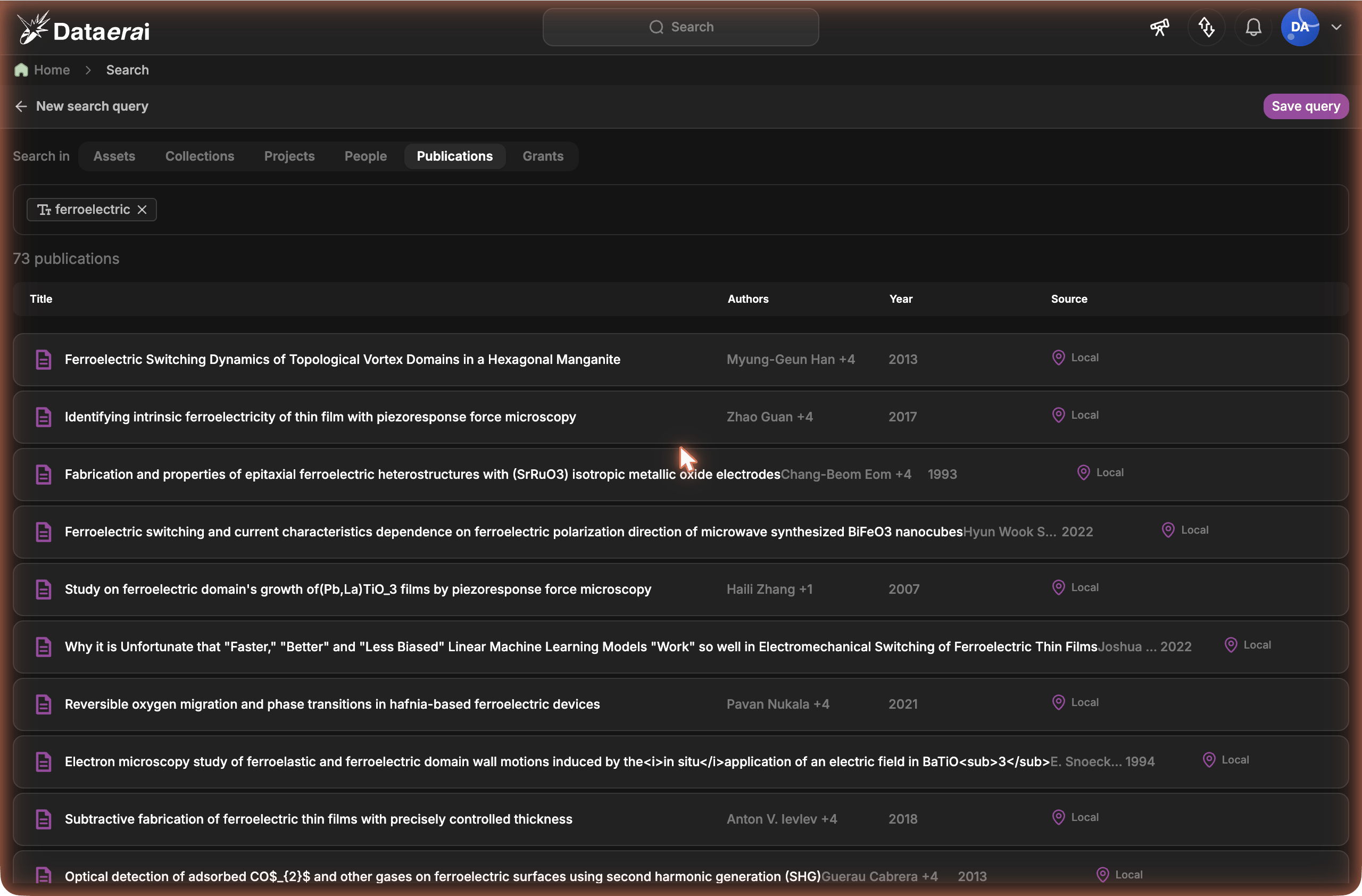
Publication results merge your workspace and external sources; Search the web brings in OpenAlex.
Find a person’s publications
Add a Person clause to the Publications search to list a specific researcher’s papers. Pick the person from People search or the search box, and the results narrow to publications they’re on. A paper matches whether the person is recorded on it as a creator or an author — scholarly sources label the same authorship list either way, so neither term hides a paper. For a person in your workspace who is linked to OpenAlex, the search also pulls their not-yet-imported papers from the web.Import a work and travel down the tree
Each OpenAlex (web) row carries an Import action. Importing a paper runs a degree-1 cascade — it fully populates the paper and the first ring of papers around it:
For the paper and every neighbour, Dataerai also imports the authors (as
lightweight stubs), institutions, grants/funders, topics, sources
(journals) and keywords, plus the citation and related-work edges
between them — so the slice of the literature you care about is fully connected
in your workspace.
The frontier closes after one hop: Dataerai does not recurse into a
neighbour’s own references. Each edge is capped, and a paper’s first batch of
neighbours imports immediately while the remainder drains in the background — so
even a heavily-cited paper imports quickly and you can keep working.
What gets imported
Once imported, works and everything hanging off them are first-class in your
workspace — they show up in works search, asset attribution, and
grant attribution.
Imports call OpenAlex on your behalf and write across your workspace, so they’re
rate-limited per user.
The publication detail sidebar
Click any Publications result to open its detail pane on the right — the same surface assets and people use. The header (title, year, origin) shows instantly; authors, funding, and metrics load just behind it. The pane works for both works already in your workspace and ones still on the web (OpenAlex), so you can size a paper up before importing it.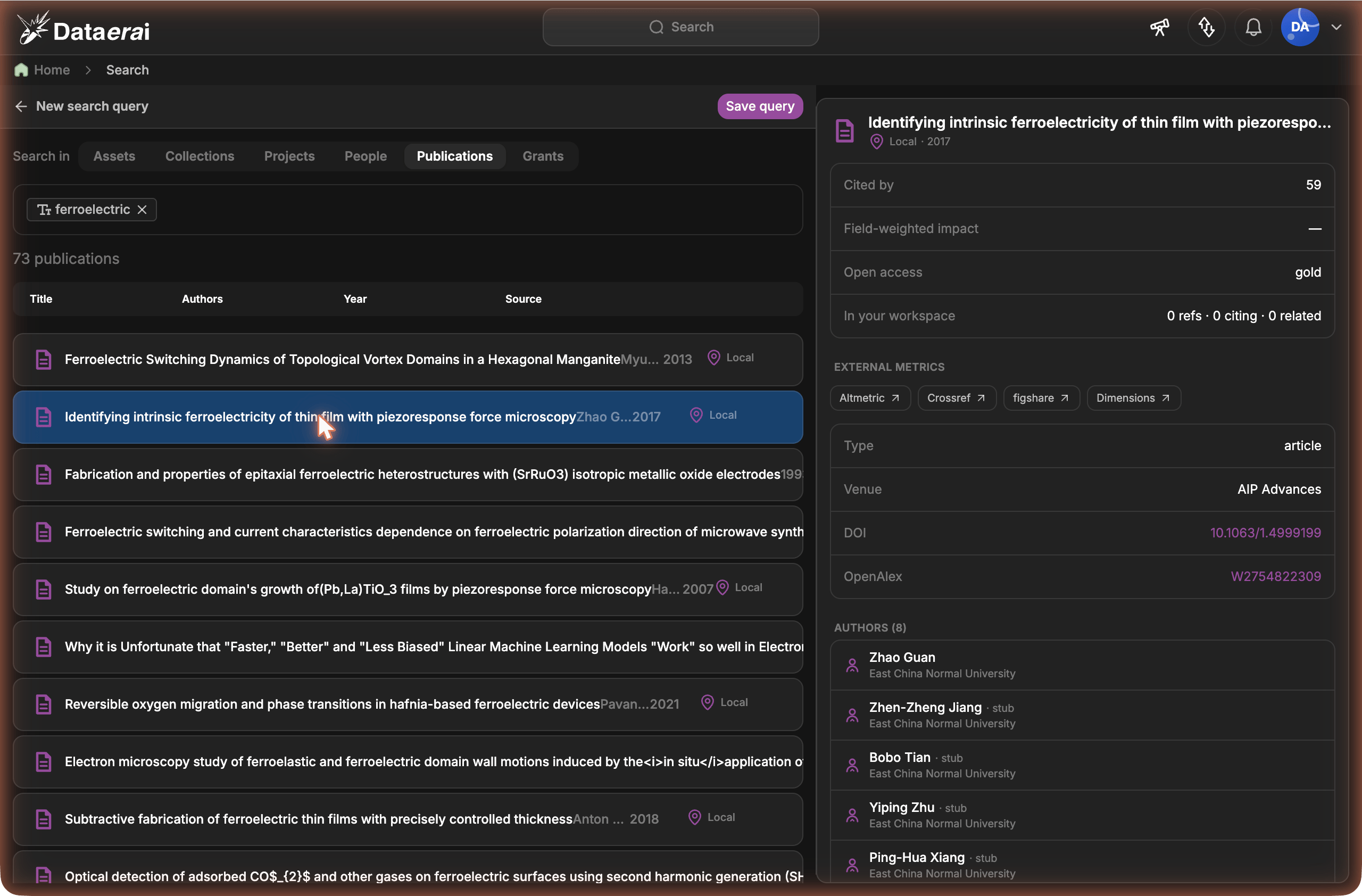
Selecting a publication opens a detail sidebar with metrics, identifiers, authors, and external-metric links.
- Click the row to swap the sidebar in place — an author opens the person pane (with an Import control if they’re not in your workspace yet); a grant’s funder opens the funder pane (its other grants and funded works). A Back to publication button returns you.
- Click the ↗ icon to go to that entity’s own page instead — an author’s
/people/:id, or the funder on OpenAlex.
/works/:id,
/funders/:id) — the same detail, full-width.
Metrics
The pane surfaces what we already know about the paper, as of the last sync (citation counts refresh on re-import, not live):
Field-weighted impact (FWCI) compares this paper’s citations to the average
for papers in the same field and year — a value of
1.0 is exactly average, above
1.0 is more-cited than its field. It’s a per-paper measure, not a journal impact
factor.
For richer, third-party metrics, the External metrics row links out by DOI to
Altmetric, Crossref, figshare, and Dimensions — no data leaves
your workspace; these are just deep links to each system’s view of the paper.