Search across your workspace and the scholarly web — assets, collections, projects, people, publications, and grants — from one query bar, combining clauses with AND, OR, and NOT.
Dataerai’s search lets you find assets by combining simple conditions into a precise query. You build a query from clauses, and combine them with AND, OR, and NOT.
1
Open search
Click the Search box in the top bar.
The Search box in the top navigation bar.
2
Start a query
The query bar expands — type to search, or run it as a natural-language Ask AI query.
The expanded query bar — type something, Ask AI, or Search.
3
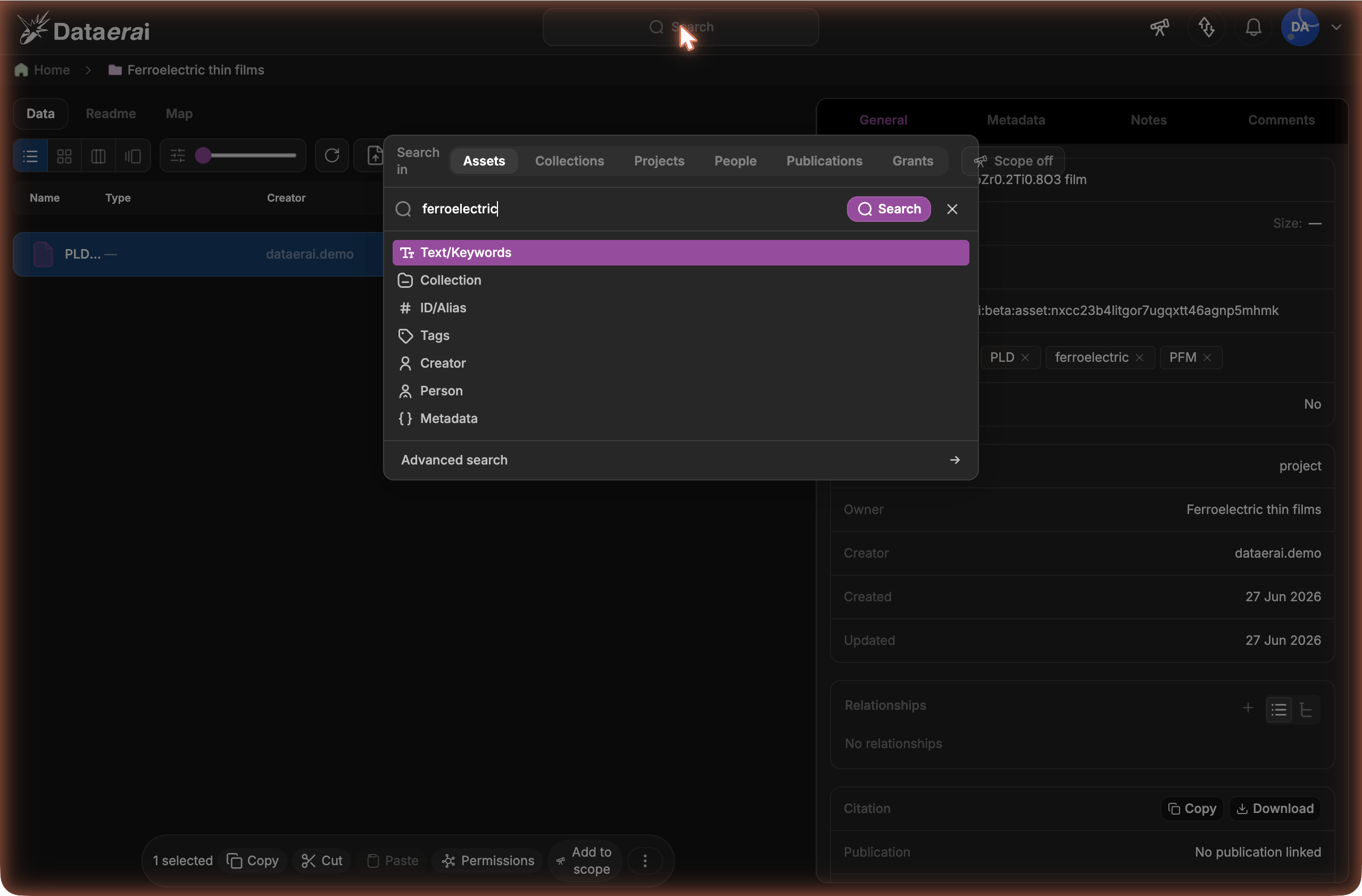
Pick clause types
As you type, Dataerai offers the clause types — Text/Keywords, Collection, ID/Alias, Tags, Creator, Person, and Metadata — plus Add Boolean Group for nesting AND/OR/NOT.
The clause-type picker — Text, Collection, ID/Alias, Tags, Creator, and Metadata.
A specific researcher recorded on the asset (the canonical person, not just the account that uploaded it).
Collection
Membership in a specific collection.
ID
A specific asset identifier.
Metadata
A structured metadata field, using an operator and value.
Use Add Boolean Group to nest clauses inside their own AND / OR / NOT group — handy when one part of your query needs different logic from the rest. The Person clause appears when your workspace has people search enabled.
Metadata clauses match on a field path with an operator and (for most operators) a value. The operators available depend on the field’s type:As you type a metadata field, Dataerai suggests keys from metadata in the assets
you can search, including nested paths such as sample.depth. When you choose a
suggested key, the data-type picker prioritizes the types observed for that key,
for example Numerical (2) before String (1). If the visible metadata
sample proves a key or operator cannot match, the chip is marked so you can edit
it before running the search.
Operator
Meaning
Types
= / ≠
Equals / does not equal
Numerical, string, boolean
>≥<≤
Numeric comparisons
Numerical
contains
Text contains a substring
String
exists / not exists
The field is present / absent
All
contains item / does not contain item
An array includes / excludes a value
Array
Extracted metadata and the metadata you add yourself are both searchable this way — for example, find every XRD scan with a specific anode material, or every asset missing a required field.
Once you’ve added one or more clauses, click Save query to keep the query for later. Dataerai suggests a name from the clauses; edit it and save. Your saved queries appear in the search box — pick one to re-run it, or open it to refine and re-save. Delete a saved query you no longer need with Delete query.
In the Publications scope, add a Person clause (pick a researcher from the People results or the search box) to list that person’s publications. A publication matches whether the person is recorded on it as a creator or an author — different sources label the same authorship list either way, so you don’t miss work that happens to use the other term.
Within the Assets scope, the Show toggle controls what your results include:
Show
Results
Assets
Only the matching assets.
Collections
Only collections — every collection that contains an asset matching your query (anywhere in its sub-collections), plus collections whose own name, description, or tags match your text.
Both(default)
An Assets section and a Collections section together.
So when a single asset deep inside a collection matches your query, that collection shows up under Collections — a quick way to find which collections hold the data you’re looking for, without opening each one. Selecting a collection result opens it.
Use a session search scope when you want repeated searches to stay inside a set
of assets you are already reviewing.
In the main data pane, select one or more assets.
Click Add to scope in the floating toolbar.
Open Search.
Turn Scope on before you run the search.
When Scope on is active, metadata search results are limited to the assets
in your current scope. Turn Scope off to search everything you can access;
the scope stays saved in the session so you can turn it back on.Use the telescope button in the top-right header to review what is currently in
scope, clear it, remove individual entries, save it, or load a saved scope.