

DataCite holds no files. Each DOI describes a dataset published somewhere else — Zenodo, Dryad, Figshare, an institutional archive — and records that dataset’s landing page. So each imported asset is a single link-out to the landing page, not a set of downloadable files. Nothing is stored in your Dataerai allocation, so importing doesn’t consume your quota.
Search DataCite
Open the Import from DataCite page, type a query, and click Search.- The search is scoped to datasets. Enter free text (for example
microscopy,climate, orgenome assembly); there’s no default query, so nothing runs until you search. - Results show Title, Type, and DOI, with the DOI and publication date under each title.
- Use Per page (25, 100, 500, or 1000) to trade clicks for latency. DataCite’s public API is rate-limited, so larger page sizes take longer.
- The result count and page X of Y are shown above the table, with Previous / Next to move between pages.
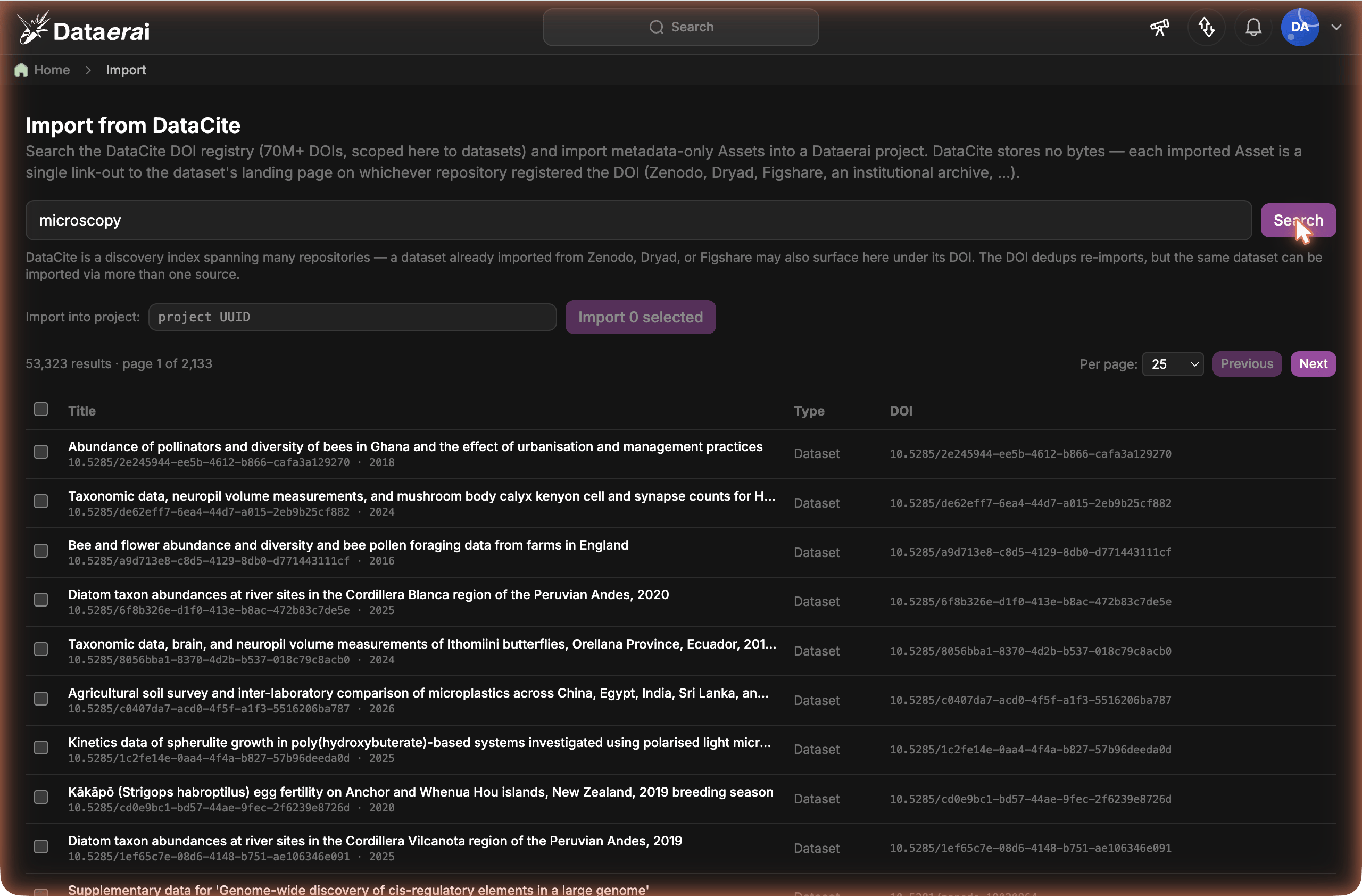
Search the DataCite DOI registry and import records as metadata-only assets that link out to their source repository.
Select and import
1
Select datasets
Tick the rows you want — click a row, or press Space or Enter on it, to toggle its checkbox. The header checkbox selects or clears everything on the current page; your selection is kept as you page through results.
2
Choose the destination project
Paste the UUID of the project that should own the new assets into the Import into project field.
3
Import
Click Import. Large selections are sent in batches automatically, and a single Import result panel summarizes how many datasets were imported (and how many new assets were created), plus any that failed and why.
The same dataset can appear under more than one source
Because DataCite spans many repositories, a dataset you could also import from Zenodo, Dryad, or Figshare also surfaces here under its DOI — those repositories register their DOIs with DataCite.- Within DataCite, re-importing the same DOI into a project is deduplicated — you won’t get a duplicate asset.
- Across sources, the same dataset imported two ways stays two assets. Importing a DOI from the DataCite page gives you a landing-page link-out; importing the same dataset from its native Zenodo or Dryad page gives you that repository’s view of the files. They aren’t merged. DataCite’s value is discovery breadth — finding the DOI no matter who hosts it — so use it to find datasets across repositories, and import from a dataset’s native source when you want that repository’s file-level view.
Next steps
Metadata-first assets
How assets that describe data elsewhere work in Dataerai.
Import from Zenodo
Import a single repository’s records with their files.
Search & discover
Find imported datasets by title, type, creator, and metadata.
Sharing & permissions
Decide who can see the datasets you import.