

Private by default
A new record’s DID has no public surface. The identity exists and is verifiable to you and anyone the record is shared with, but resolving it anonymously from the outside reveals nothing about the content. Your data stays gated until you decide otherwise. You and the people the record is shared with can still preview its DID document before publishing: View DID document shows thedid:web document it
would publish for its current state, marked “Preview · not published yet.”
The preview is computed on the spot — nothing is published or made public until
you choose to. To anyone without access (and to anonymous visitors), a private
DID’s document stays hidden.
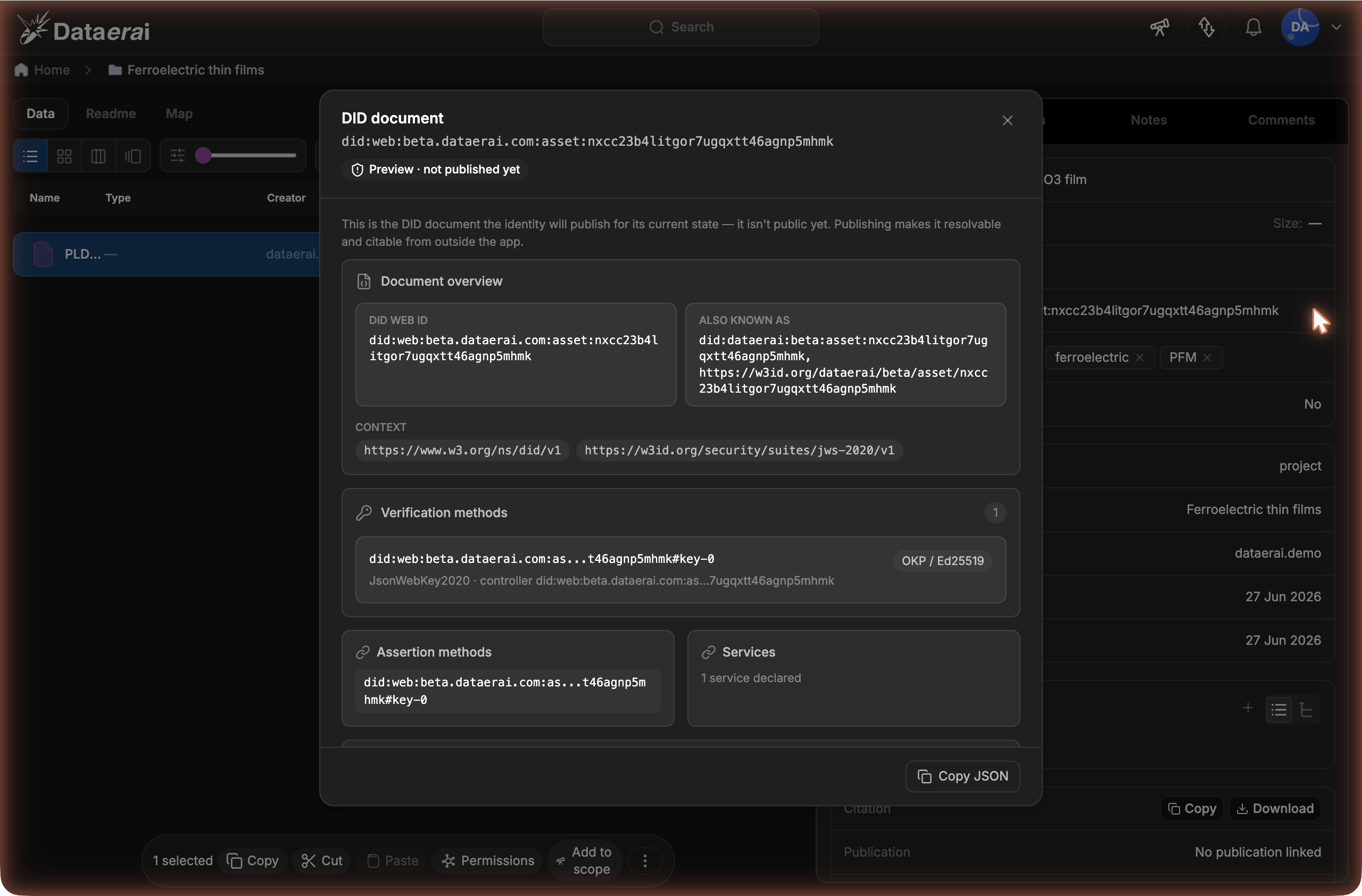
Preview the document a record will publish from its View DID document modal.
Sharing isn’t publishing. Sharing a record (or making it public to signed-in
users) controls who can read, verify, and preview its DID document.
Publishing is the separate, deliberate, one-way step that makes the
did:web
document public — resolvable and citable by anonymous readers from outside
the app (below).Publish a record
Publishing flips a DID from private to public. The web app shows and previews a DID, but the publish step itself is currently available through the REST API (and anything that calls it). Send an authenticated request as the record’s creator or an admin:$DATAERAI_SERVER with your Dataerai host and {did} with the record’s
DID. See Authentication for how to get a token.
Once public, the DID resolves for anyone and can be cited freely.
Publishing is computed from the record’s current state at the moment you
publish — the resulting
did:web document is a snapshot. Later edits to the
record don’t change the already-published document, which keeps citations
reproducible.Cite with did:web
A published DID resolves to a did:web document — a standard, web-hosted
identity document at a stable URL. This is what you cite, and what others resolve
to verify your record. The URL follows the DID’s kind and subject:
<kind> is asset, dataset, or person. The quickest way to find the exact
URL is Open did.json in the View DID document modal on a published
record.
Your organization’s own identity document — the binding between your domain and
its signing key — lives at the well-known location:
Tombstones and supersedes
Deleting a record doesn’t erase its DID. Instead, the DID is tombstoned: it still resolves, now marked as tombstoned, so existing citations don’t simply break. When two person records are merged, the merged-away DID is superseded and points to the surviving one.Reference it in downstream work
A published DID is a stable, verifiable handle you can reference elsewhere. A dataset DID, for example, can be recorded as a training input so that an ML run’s lineage graph cites exactly which verified data fed it — by DID, not by a fragile path or name.Need to let someone outside the record’s access verify it without publishing
— say an external reviewer who isn’t a member? As the record’s creator or an
admin, mint a time-boxed read capability for that DID through the API. The
capability grants verifiable access to just that one record, to just that reader,
without making the DID public. The reviewer passes the token when they resolve —
see Share a gated DID. (People who can
already read the record don’t need one — see
Private by default.)
Next steps
Resolve & verify
Confirm a published DID is authentic and unchanged.
Verifiable identifiers
What DIDs are and how the trust model works.