

Choose a chart
Open an asset and the sidebar’s General tab shows a preview chart. A Visualization dropdown lists every chart that fits the data — only the kinds Dataerai can build from the current columns appear, so you never pick one that would come up empty:- Histogram — the distribution of a single column’s values.
- Table — a row-level preview of the data.
- Scatter — one numeric column against another.
- Time series — values traced in order, for sequential or time-based data.
- Distribution — box, violin, or bar charts grouped by a category.
- Heatmap — a matrix or density grid across two columns.
Delete an asset with generated visualization data
When Dataerai prepares charts for a tabular asset, it may create an auto-promoted dataset version for that visualization. If you delete the asset later, the confirmation dialog includes Also delete auto-promoted visualization dataset versions?. The option is selected by default so the generated visualization data is removed with the asset. Clear the option if you want to stop and review linked dataset versions before deleting the asset. Dataset versions that were not auto-promoted for visualization still protect their source asset and must be removed separately.Pick a column, get a chart
Select a column and Dataerai chooses the right chart for its type:- Numeric and date/time columns render as a histogram — the distribution of values across bins.
- Categorical and text columns render as a bar chart of category counts — the most common values.
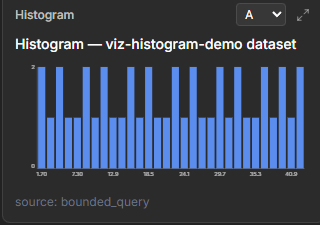
A numeric column renders as a histogram of its distribution — pick the column from the selector at the top of the chart.
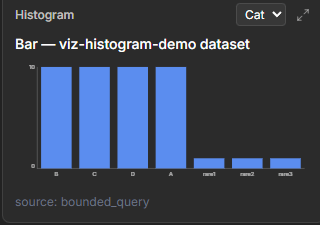
Selecting a categorical column switches the chart to a bar chart of category counts.
Relate two columns
Beyond single-column distributions, Dataerai charts relationships between columns — a scatter plots one numeric column against another, so you can spot correlations and outliers at a glance. Add an optional color column to shade the points — by category for a label column, or along a gradient for a numeric one — so a third dimension reads at a glance.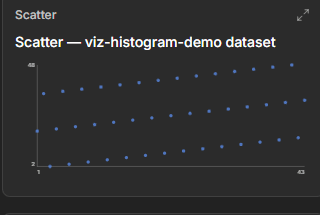
A scatter chart relates two numeric columns to reveal correlation and outliers.
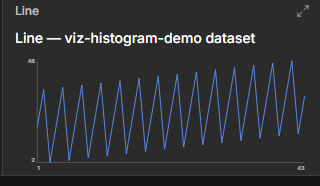
A time series chart traces a column's values in sequence.
Compare distributions across groups
When your data has a category to group by and a numeric value to summarize, a distribution chart compares groups side by side. Switch between three views:- Box and violin plots show the spread of values within each group.
- Bar charts aggregate each group into a single number — choose count, mean, median, or sum.
See a matrix or density grid
A heatmap renders a two-column grid:- With two categorical columns, it builds a pivot matrix — one cell per pair of categories.
- With two numeric columns, it builds a density grid — useful for spotting where values cluster.
Adjust the view
Open the full chart to tune it with a live parameter panel. The controls match the chart you’re viewing:- Bin count — how many bins a numeric histogram uses.
- Top categories — how many categories a category chart shows.
- Max rows — the amount of data scanned for the chart.
- Group, value, and aggregation — for distribution and heatmap charts, the columns to group by and summarize.
- Colour scale — the palette a heatmap uses.
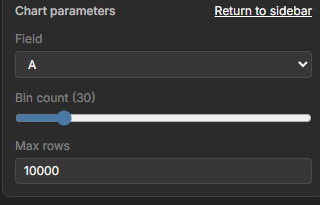
Open the full chart to reveal the Chart parameters panel — field, bin count, and max rows.
Large datasets are automatically sampled so charts stay fast and responsive. When a chart is based on a sample, you’re working with a representative subset rather than every row.
Preview the rows
Alongside the charts, you can preview the dataset’s rows as a table to see the actual values behind a column — useful for sanity-checking before you read too much into a distribution.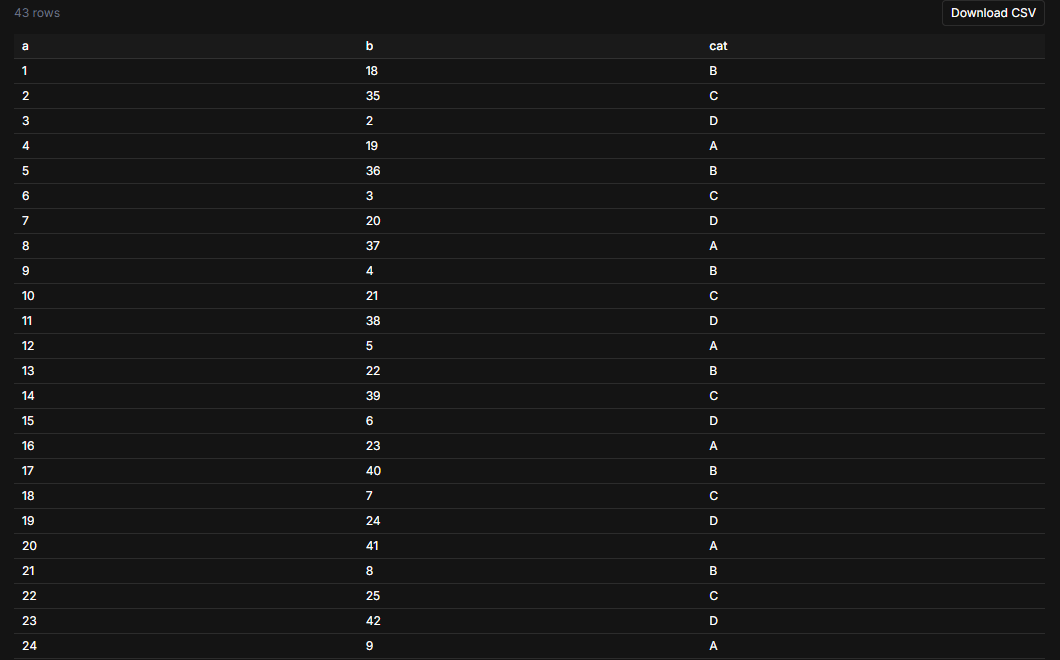
The expanded row preview — all rows, a Download CSV action, and per-column toggles.
Next steps
Understand your data
The schema and statistics behind the charts.
Search & discover
Find the data you want to chart.